



Jitter has been impacting the stability of World of Warcraft matches and causing delays in command responses during raids, dungeons, and PvP encounters. The problem occurs when there are constant fluctuations in communication between the player's computer and the game servers.
In practice, this latency variation directly interferes with the real-time synchronization of actions. As a consequence, abilities can be delayed, characters exhibit irregular movement, and commands are not executed at the expected moment.
This scenario is particularly concerning for players of competitive content and high-level activities, where response time and precision directly influence team performance.
Jitter Interferes with Command Response
While ping measures the time it takes for data to leave the computer, reach the server, and return to the player, jitter measures the variation of this latency throughout the connection.
When data packets stop arriving at constant intervals, the game loses stability in real-time communication.
Among the most reported effects by World of Warcraft players are:
- Delay in ability activation;
- Short freezes during combat;
- Targeting failures;
- Inconsistent movement;
- Loss of precision in PvP encounters.
Additionally, raids with dozens of simultaneous players often amplify the impact of oscillation. In fights that demand quick coordination, small variations can already compromise important mechanics.
Connection Fluctuations Increase During Peak Hours
The causes of the problem can be linked to both the home network and the routes used by providers to the game servers.
Among the most frequent factors are:
- Congested Wi-Fi;
- Excessive connected devices;
- Background downloads;
- Simultaneous video streaming;
- Old or overloaded routers.
Furthermore, peak hours increase the overload on data traffic. As a result, communication between player and server can suffer constant fluctuations during matches.
Another important factor involves the quality of the route used to World of Warcraft's data centers. Long or unstable routes increase latency variation and hinder immediate command response.
Test a Solution to Reduce Ping in World of Warcraft for Free
Players experiencing high ping in World of Warcraft can use route optimization programs to try and improve connection stability during matches.
Among the available options is NoPing, a system that analyzes different routes in real-time to find potentially more stable paths to the game servers.
To use the program, the process includes:
- Accessing the website and creating an account for a free trial;
- Downloading and opening the software on your computer;
- Searching for "World of Warcraft" within the platform;

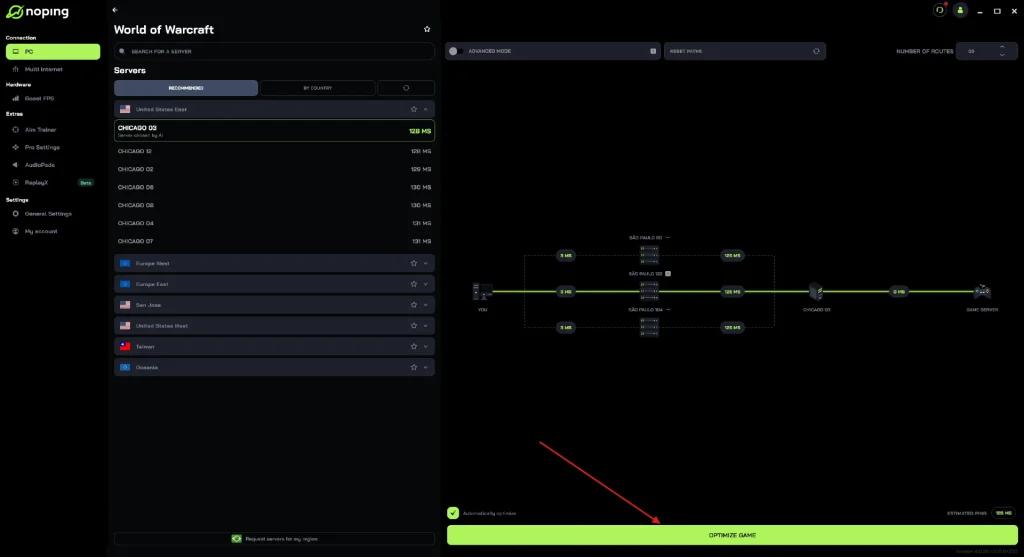
- Clicking on the game and selecting "Optimize automatically";
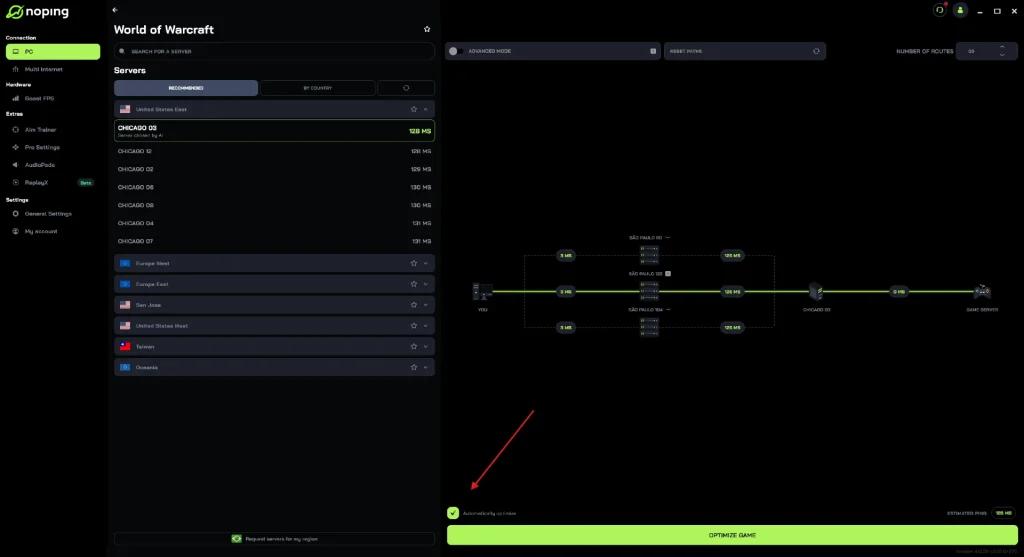
- Then, selecting the "Optimize game" option.
What Level of Jitter Harms Online Matches?
Network specialists use certain parameters to measure connection stability in online games.
Connections with jitter between 0 and 20 ms usually show good stability. Between 20 and 50 ms, oscillation can already cause small delays during more intense moments.
Above 50 ms, the impacts become noticeable in gameplay. In these cases, commands can be delayed, abilities show synchronization failures, and character response loses precision during fast-paced encounters.
In competitive content and high-level raids, maintaining connection stability remains one of the main factors to avoid failures during matches.